


We’re excited to unveil the latest update to the NAGA Android app: a completely redesigned Home Screen.
Trading moves fast, and you shouldn’t have to hunt for your data. The new dashboard serves as your mission control, giving you a high-level overview of your account, positions, and market activity the moment you open the app.
Everything You Need, At a Glance
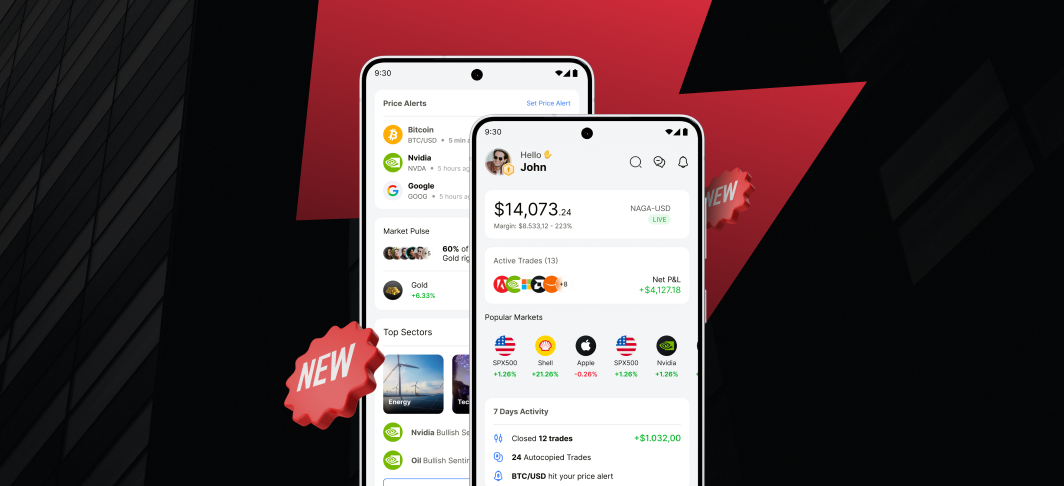
The new Home screen is built around intuitive widgets that prioritise the information you need most, helping you to take action fast.
The Account Widget: Track your equity, margin level, and margin percentage in real-time. Tapping this widget reveals a full breakdown of your balance figures. If funds are low or you approach a margin call, follow the quick link to add funds to your account.
The Positions Widget: Instantly see how many trades you have open and your total running Net P&L. The icons represent each market you’re trading in, so you can visualize your exposure instantly. Tap the widget to see all your active trades in detail.
Popular Markets: Jump from monitoring your account to executing your next trade in seconds on our most popular markets.
7-Day Activity: Stay on top of your performance with a summary of your realized P&L and key stats from the past week.
Alerts: View your three most recent triggered price alerts or set new ones immediately. Tapping an alert takes you directly to that market, keeping you reactive to price action.
Upcoming Changes
In future releases we’ll be adding features to make the home screen more powerful for your trading:
Markets: Choose which markets to show in place of Popular Markets
Alerts: See active and triggered alerts
Accounts: Switch or create new accounts from the account widget
If you haven’t downloaded our app yet, now’s the perfect time to do it and start enjoying all its benefits today.


